
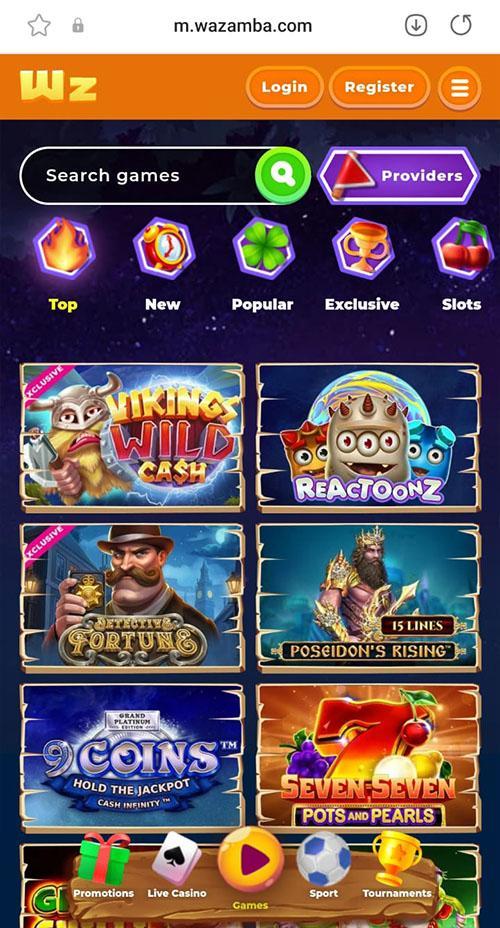
The user interface is what you touch, swipe, and tap every time you open a casino app, so it counts more than any bonus or game count. casino wazamba kirjautuminen Casino’s app doesn’t just shrink the desktop site; it reimagines how you move around on a small screen. This review walks through the interface step by step—from getting the app onto your phone to submitting your first bet, how menus are laid out, and how the visuals enhance both quick browsing and focused sessions. We detail the installation process, navigation logic, and real‑world performance. The aim is to provide you a clear, no‑nonsense view of what it’s like to use the Wazamba app, so you can determine if it matches your expectations for ease and clarity.
Smart Interface and Core Navigation
An user-friendly mobile casino interface minimizes mental effort so you can concentrate on the games. Wazamba’s app demonstrates this from the first launch. Primary actions—cashier, game lobby, promotions—sit within easy reach. The navigation stays shallow; critical functions are never more than two taps away, which makes a big difference during short mobile sessions. A restrained colour palette, clear typography, and well-defined icons create a visual hierarchy that works across languages. The app also honors system‑level accessibility settings, modifying font sizes where possible, which assists an international audience. By putting clarity ahead of decoration, the interface functions for newcomers who need guidance and for experienced players who seek speed.
Error prevention and recovery are equally prioritized. If a connection drops mid‑game, the app shows a clear status indicator and tries to restore the session without a full restart. Buttons for sensitive actions—large withdrawals or closing a game—either demand deliberate confirmation or are placed away from high‑traffic zones. Interaction patterns remain consistent everywhere: back buttons, swipe gestures, and modal windows work the same way across sections. This defensive design quickly builds trust, so the interface never becomes a source of frustration. For a global player base with varying digital literacy, that kind of uniformity goes beyond convenience; it’s necessary, enabling the entertainment value of the games take center stage.
The app structures content through a persistent bottom navigation bar with icons for home, games, promotions, cashier, and profile. Tapping any icon transitions views instantly without reloading, creating fluid transitions. The home screen acts as a dynamic dashboard, surfacing featured games, tournaments, and personalised recommendations. A search function at the top of the games section reacts quickly to partial inputs, helping you locate specific titles. Secondary actions—settings, transaction history, responsible gaming tools, and support—are tucked into a hamburger menu or edge swipe, preserving the main screen uncluttered. We particularly prize the always‑visible link to deposit limits and session timers, placed in plain language rather than concealed in a legal footer. This division between primary and secondary navigation manages quick yle.fi play and serious account management without friction.
Downloading and Installing the Wazamba Casino App
Obtaining the app onto your device is straightforward, though the exact steps change by platform. For Android, you fetch the APK file directly from the official Wazamba website after enabling installations from unknown sources in your security settings. For iOS, the app may be present on the Apple App Store for one‑tap installation; if not, the site offers a progressive web app alternative. Always use the official domain to avoid counterfeit versions. The installation wizard requires only essential permissions, such as storage access for caching game assets, and never demands contacts or unrelated data. You can browse the game lobby in demo mode before logging in, which honors your desire to check out the interface first.
- Android: Go to the Wazamba site, turn on “unknown sources,” fetch the APK, and tap to install.
- iOS: Fetch from the App Store if available; otherwise, adhere to the site’s PWA instructions.
After installation, access with existing credentials or create a new account. The app does not require registration hurdles upfront, and the entire flow is described in plain language without technical jargon. Both platforms keep your settings, and the app automatically looks for updates on launch, prompting a quick download when a new version is released.
Main Distinctions from the Desktop Experience
The mobile app compresses the desktop’s extensive navigation into a bottom bar, creating a more straightforward browsing path that accommodates focused play. Hover‑based interactions are substituted by tap‑and‑hold or swipe gestures; for example, game previews show up on long press instead of mouse hover. The app handles one game at a time, unlike desktop where multiple browser tabs are possible, which lessens confusion and resource drain. The cashier and account sections employ a step‑by‑step wizard with larger form fields, reducing input errors on smaller keyboards. Push notifications replace email alerts for promotions and account activity, with conservative default settings that you can personalise.
Live chat support integrates as an overlay within the app, keeping you inside the ecosystem rather than opening a new window. While the core game library is unchanged, the mobile interface highlights touch‑optimised titles and portrait‑mode slots more visibly. The app does not try to mirror the desktop experience inch for inch; it builds a parallel interface that respects mobile constraints and advantages, leading in a unique but equally capable product. This careful adaptation secures that the mobile experience seems native and not merely a shrunken website.
Account Administration and Cashier Features
The cashier area emphasizes transparency with distinct tabs for deposits, withdrawals, and transaction history. The deposit screen displays available payment methods with defined minimum and maximum limits, processing times, and any fees. Selecting a method launches a straightforward form that uses numeric keyboards for amount entry, reducing errors. The app supports cards, e‑wallets, prepaid vouchers, and cryptocurrencies where permitted. After a confirmed deposit, your balance updates immediately, and a push notification confirms the transaction. The withdrawal flow reviews your verification status and asks you to complete any missing KYC steps before allowing a cashout, blocking later delays. You can keep frequently used methods, but security credentials are required for sensitive actions.
The transaction history is searchable by date and type, with expandable entries showing full details including transaction IDs. The profile section enables you to update personal details, set communication preferences, and configure responsible gaming tools. Self‑exclusion and limit‑setting controls are shown in plain language with immediate confirmation, clearing ambiguity. This directness helps players make informed decisions. Overall, the cashier interface feels a secure financial tool rather than an afterthought, establishing trust in the platform.
Game Library Presentation and Sorting Features
The game catalogue uses a arrangement of large, premium thumbnails that load progressively, enabling browsing even on slower networks. Quick tabs for slot games, live dealer casino, table games, and jackpot games appear at the top, and you can swipe horizontally to get a preview of each section. A strong filtering tool allows you to sort by developer, popularity, or alphabetical listing. The developer filter enables choosing multiple, so you can see games from multiple studios at once—a minor yet significant detail that many platforms don’t have. Each game thumbnail shows a short description, variance level, and minimum bet range via a press and hold, eliminating the hassle of opening a game only to realize it doesn’t fit. Live casino tables present real‑time dealer images and seat availability, aiding you in picking a seat.
A bookmark system, marked by a heart icon, allows you to save games, and the set syncs with your account across devices. The move from lobby to game is fluid, with a quick loading animation that masks initialisation. Once inside a game, a subtle floating button brings you back to the lobby right away, skipping a hidden exit. This entire process—from looking to playing to coming back—reflects advanced interface design. The app also emphasizes touch‑friendly games and portrait slots clearly, making sure the mobile experience feels natural rather than a scaled‑down desktop version.
Speed, Bandwidth Usage, and Device Compatibility
The app performs consistently on mid-tier and flagship devices from the past three years. It retrieves game assets on demand, maintaining startup time under five seconds on a reliable connection. Slots, live dealer streams, and table games run at fluid frame rates with no perceptible input lag. An hour of continuous play uses roughly 12–15% of a standard 4000mAh battery, equivalent to other high‑quality gaming apps. Data usage is moderate: an hour of slot play averages 20–30 MB, while a live dealer table at medium quality consumes about 100–150 MB. A quality selector in live streams lets you to switch to standard definition to conserve bandwidth, and the app buffers frequently played games to minimize repeat data consumption.
Compatibility is wide: Android 8.0 and above, and iOS 12 or later, covering iPhone 6s and newer. We suggest keeping your operating system current for optimal security and feature support. The app routinely checks for updates on launch and triggers a quick download, so you never need to by hand hunt for improvements. This focus to performance and resource management provides that the interface remains snappy even during background processes like live bet settlements, providing a seamless experience across a broad range of devices.
Frequently Asked Questions
Is downloading the Wazamba Casino app free?
Absolutely, the Wazamba Casino app is fully free to download for Android and iOS devices. No cost is associated with the installation file or accessing the app’s features. Deposits are only necessary if you want to play real‑money games, while browsing the lobby and trying demo versions of games require no payment. Always download the app from the official Wazamba website or the Apple App Store to avoid counterfeit versions that may request payment.
Which devices and operating systems support the app?
The Wazamba app is compatible with a wide variety of modern smartphones and tablets. On Android, devices operating version 8.0 or newer are supported, encompassing most models launched from 2017 onwards. iOS users need version 12.0 or above, which includes the iPhone 6s and newer, as well as compatible iPad models. It is advisable to keep your operating system updated to the newest version to guarantee the best performance, security, and access to all interface features without compatibility problems.
How do I update the Wazamba Casino app to the latest version?
Updating the app is designed to be simple. On Android, when a new version is ready, the app will show a notification upon launch inviting you to download the updated APK file. Simply follow the on‑screen link to the official site and install it over the existing version. For iOS, updates are handled through the App Store’s standard update mechanism. In both cases, your login credentials, favourites, and account balance are preserved, and the update process typically takes less than a minute to complete.
Can I use the same account on the app and the desktop site?
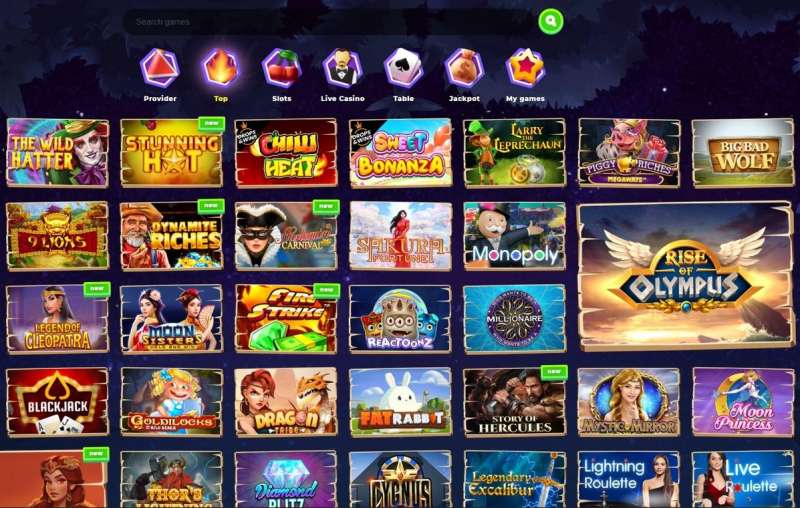
Without a doubt. Your Wazamba Casino account is unified across all platforms. You can create an account on the desktop site and log into the app with the same credentials, or vice versa. Your balance, transaction history, game favourites, and responsible gaming settings sync in real time. This means you can start a gaming session on your computer and pick up right where you left off on your mobile device, with no need to transfer funds between separate accounts.

Does the mobile app offer as secure as the desktop website?
The smartphone application utilizes the same high‑level security measures to the computer client. All information transmitted between the application and Wazamba’s servers undergoes encryption using TLS protocols, securing your personal and financial information. The application also supports biometric login methods including fingerprint and face recognition on devices that support them, offering an extra layer of security. Regular security audits and compliance with industry standards ensure that the mobile platform offers a safe environment for your gaming activities.